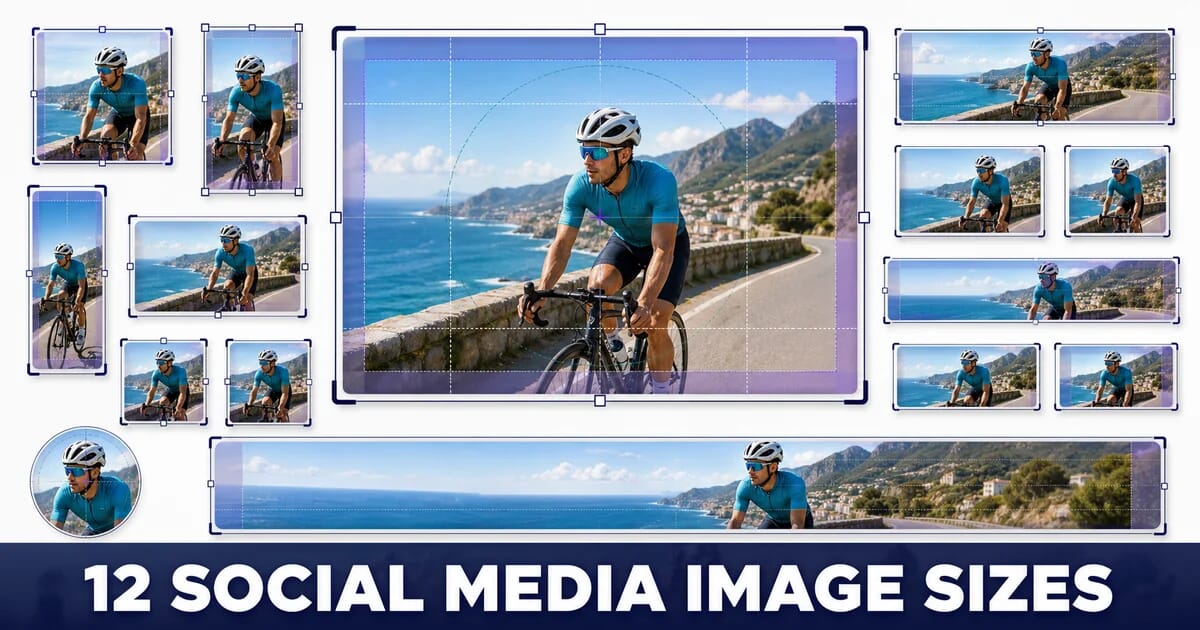
12 Social Media Image Sizes Worth Bookmarking
Current image sizes for Instagram, Facebook, LinkedIn, X, Pinterest, YouTube and TikTok, with safe zones, aspect ratios and file limits.
Disclosure: ImageGuide is published by Sirv, an image CDN company. This guide mentions Sirv products. Read how we write these guides.
Quick answer
Select social image dimensions by placement rather than by network name alone. Square feed images, vertical stories, wide link previews, and profile pictures need different compositions. Keep important content away from crop edges, check the current platform reference, and preview on mobile before publishing.
Reference for this answer: Open Graph protocol.
Every platform crops differently, and each one re-encodes what you upload. Getting the dimensions right is the difference between a crisp post and a soft, badly cropped one with your logo cut off.
Twelve sizes cover almost everything a marketing team ships. Below each one is the safe zone, the file limit, and what the platform does to your file after upload.
One caveat before the numbers. Platforms change specs without announcement. These reflect current published guidance, and the aspect ratios are far more durable than the exact pixel counts. When a campaign matters, check the platform’s own spec page before you export.
The Whole Set
| # | Placement | Pixels | Ratio |
|---|---|---|---|
| 1 | Instagram feed, square | 1080 × 1080 | 1:1 |
| 2 | Instagram feed, portrait | 1080 × 1350 | 4:5 |
| 3 | Stories / Reels / TikTok | 1080 × 1920 | 9:16 |
| 4 | Facebook feed | 1200 × 630 | 1.91:1 |
| 5 | LinkedIn post | 1200 × 627 | 1.91:1 |
| 6 | LinkedIn square post | 1200 × 1200 | 1:1 |
| 7 | X / Twitter in-stream | 1600 × 900 | 16:9 |
| 8 | Pinterest pin | 1000 × 1500 | 2:3 |
| 9 | YouTube thumbnail | 3840 × 2160 | 16:9 |
| 10 | Open Graph / link preview | 1200 × 630 | 1.91:1 |
| 11 | Profile picture | 400 × 400 | 1:1 |
| 12 | Cover / banner | Varies, see below | Varies |
1. Instagram Feed, Square — 1080 × 1080
The safe default. Square posts display identically in the feed, the profile grid, and most embeds.
| Property | Value |
|---|---|
| Upload size | 1080 × 1080 |
| Ratio | 1:1 |
| Max file size | 30 MB |
| Formats | JPEG, PNG |
| Grid crop | None, it is already square |
Instagram re-encodes everything, so uploading a 4000 px file gains nothing and often looks worse than a clean 1080 px export. Give it exactly 1080 pixels wide.
See the Instagram post dimensions page for the full spec.
2. Instagram Feed, Portrait — 1080 × 1350
The highest-value size on Instagram, because it occupies the most vertical space in the feed. A 4:5 portrait post is 25% taller than a square one on the same screen.
| Property | Value |
|---|---|
| Upload size | 1080 × 1350 |
| Ratio | 4:5 |
| Profile grid crop | Centre square |
That last row is the trap. Your post appears full-height in the feed but is cropped to a centre square on your profile grid. Keep the essential content within the middle 1080 × 1080 or your grid will show headless models and cropped product shots.
┌─────────────────┐  ← 1080 × 1350 as seen in feed
│   crop zone     │
├─────────────────┤
│                 │
│   SAFE: 1:1     │  ← what the profile grid shows
│                 │
├─────────────────┤
│   crop zone     │
└─────────────────┘
3. Stories, Reels and TikTok — 1080 × 1920
One size covers Instagram Stories, Instagram Reels, Facebook Stories, TikTok, YouTube Shorts, and Snapchat. Full-screen vertical, 9:16.
The Safe Zones Are the Whole Story
Each platform overlays its own interface on top of your image. Content in those bands gets covered.
| Zone | Height | Covered by |
|---|---|---|
| Top | ~250 px | Profile name, close button, progress bars |
| Bottom | ~350 px | Caption, CTA, engagement buttons, sound label |
| Right edge | ~120 px | Like, comment, share, sound icons |
That leaves a usable area of roughly 1080 × 1320, centred. Design inside it, and let the background bleed to the full frame.
┌──────────────┐ 1080 × 1920
│  UI overlay  │ 250 px
├──────────────┤
│              │
│  SAFE ZONE   │ 1320 px
│              │
├──────────────┤
│  UI overlay  │ 350 px
└──────────────┘
Keep all text and logos inside the safe zone. See the Instagram Story page.
4. Facebook Feed — 1200 × 630
| Property | Value |
|---|---|
| Shared link preview | 1200 × 630 (1.91:1) |
| Square feed post | 1200 × 1200 |
| Minimum for link previews | 600 × 315 |
| Max file size | 30 MB |
Facebook link previews use the same 1.91:1 ratio as Open Graph, which is convenient: one asset serves both. Below 600 × 315, Facebook falls back to a small thumbnail card instead of a large image card, which is a significant drop in click-through.
Mobile feed crops the sides of very wide images. Keep text within the middle 80%. See the Facebook post page.
5. LinkedIn Post — 1200 × 627
| Property | Value |
|---|---|
| Shared link / single image | 1200 × 627 (1.91:1) |
| Max file size | 5 MB |
| Formats | JPEG, PNG, GIF |
LinkedIn’s 5 MB limit is stricter than most. A 1200 × 627 JPEG at quality 85 is around 180 KB, so this is only a problem if someone uploads a raw export.
Text Rendering Is the Real Issue
LinkedIn re-encodes uploads aggressively, and small text suffers. If your image contains type:
- Keep body text at 24 px or larger in a 1200 px-wide canvas
- Use high contrast; thin light-grey type disintegrates
- Export as PNG when the image is mostly text and flat colour
- Export as JPEG at quality 85+ when it is mostly photographic
See the LinkedIn post page.
6. LinkedIn Square Post — 1200 × 1200
Square posts take more vertical space in the LinkedIn feed than 1.91:1 images, for the same reason portrait wins on Instagram. For native posts, where you are not sharing an external link, square is usually the better choice.
Use 1.91:1 when you are sharing a link and want the preview card. Use 1:1 when you are uploading an image directly.
7. X / Twitter In-Stream — 1600 × 900
| Property | Value |
|---|---|
| In-stream image | 1600 × 900 (16:9) |
| Link card, large | 1200 × 628 |
| Max file size | 5 MB (JPEG/PNG), 15 MB (GIF) |
The Card Type Decides the Crop
<!-- Large image card: 1.91:1, prominent -->
<meta name="twitter:card" content="summary_large_image">
<meta name="twitter:image" content="https://example.com/share-1200x630.jpg">

<!-- Small square thumbnail: usually not what you want -->
<meta name="twitter:card" content="summary">
If your links show a small square thumbnail instead of a wide banner, the card type is wrong, not the image. See the Twitter/X post page.
8. Pinterest Pin — 1000 × 1500
| Property | Value |
|---|---|
| Standard pin | 1000 × 1500 (2:3) |
| Max file size | 20 MB |
| Longer pins | Allowed, but truncated in the feed |
Pinterest is the one major platform where taller genuinely wins, because the feed is a vertical masonry grid. A 2:3 pin occupies more space than a square one. Going beyond 2:3 gets truncated with a “see more” cut, so 2:3 is the sweet spot rather than the minimum.
Pinterest is also a visual search engine, which makes alt text and surrounding context matter more here than on other platforms. The visual search guide covers it.
9. YouTube Thumbnail — 3840 × 2160
| Property | Value |
|---|---|
| Thumbnail | 3840 × 2160 (16:9) |
| Minimum width | 640 px |
| Upload limit | Mobile video thumbnail: 2 MB; desktop: 50 MB |
| Formats | JPG or PNG |
YouTube’s current thumbnail guidance recommends 3840 × 2160 for videos and distinguishes upload limits by device. Shorts use a vertical composition, and podcast playlists use a square one. Check the current guide before exporting; the older 1280 × 720 recommendation is not the current suggested source size.
Design for 168 Pixels Wide
Your thumbnail is displayed at roughly 360 px on desktop search and around 168 px on some mobile surfaces. Whatever you design must still read at that size:
- Three or four words maximum
- Very high contrast between subject and background
- Faces large in frame
- No fine detail, which disappears entirely
See the YouTube thumbnail page.
10. Open Graph / Link Preview — 1200 × 630
The one that controls how your pages look when anyone shares them anywhere: Slack, WhatsApp, Discord, iMessage, Facebook, LinkedIn.
<meta property="og:title" content="12 Social Media Image Sizes Worth Bookmarking">
<meta property="og:description" content="Current dimensions, safe zones and file limits for every major platform.">
<meta property="og:image" content="https://example.com/og/social-sizes.jpg">
<meta property="og:image:width" content="1200">
<meta property="og:image:height" content="630">
<meta property="og:image:alt" content="Chart of social media image dimensions by platform">
<meta property="og:type" content="article">
<meta property="og:url" content="https://example.com/guides/social-media-image-sizes/">
Four Rules That Break Previews
- Use an absolute URL. A relative
og:imagepath fails in almost every scraper. - Declare
og:image:widthandog:image:height. Without them, some clients render a small card while they wait to measure the image. - Serve JPEG or PNG. Many scrapers still do not decode WebP or AVIF. This is the one place on a modern site where you should not serve modern formats.
- Do not require authentication. If the image sits behind a login, a session cookie, or a bot-blocking rule, the scraper sees nothing.
Previews Are Cached Aggressively
Change the image and the old one persists, sometimes for weeks. Either version the filename or force a refresh:
| Platform | Refresh tool |
|---|---|
| Sharing Debugger | |
| Post Inspector | |
| X | Card Validator |
| Slack, WhatsApp, Discord | Version the URL |
See the Open Graph image page.
11. Profile Picture — 400 × 400
| Platform | Upload | Displayed |
|---|---|---|
| 320 × 320 | 110 px circle | |
| 400 × 400 | 170 px circle | |
| LinkedIn personal | 400 × 400 | 200 px circle |
| LinkedIn company logo | 300 × 300 | 60–130 px square |
| X / Twitter | 400 × 400 | 133 px circle |
| YouTube channel | 800 × 800 | 88 px circle |
Uploading 400 × 400 everywhere is safe: it exceeds the minimum on every platform without being wasteful.
Design for the Circle
Most platforms crop to a circle, which removes the corners. A square logo with content near its edges loses that content. Add roughly 10% padding on all sides, and test by drawing a circle inscribed in your square export.
12. Cover and Banner Images
The messiest category, because each platform crops differently across devices.
| Placement | Upload | Safe zone |
|---|---|---|
| Facebook page cover | 851 × 315 | Centre 640 × 312 |
| LinkedIn personal banner | 1584 × 396 | Centre-right; avatar covers lower left |
| LinkedIn company banner | 1128 × 191 | Centre |
| X / Twitter header | 1500 × 500 | Centre; avatar overlaps lower left |
| YouTube channel art | 2560 × 1440 | Centre 1546 × 423 |
YouTube channel art is the extreme case: you upload 2560 × 1440, but the area guaranteed to be visible on every device is only 1546 × 423 in the centre. Everything outside that is cropped on mobile.
For any banner with an avatar overlay, keep the lower-left corner empty. The profile picture sits there and will cover whatever you put underneath.
Generating Every Crop From One Master
Twelve sizes per campaign is a lot of exporting. The efficient approach is one high-resolution master plus URL-based crops.
Shoot or Design at 2560 × 2560
A large square master can be cropped to every ratio on this list without upscaling.
Then Derive by URL
With Sirv, each size is a URL parameter rather than a separate export:
# Instagram square
https://demo.sirv.com/campaign.jpg?w=1080&h=1080&scale.option=fill

# Instagram portrait
https://demo.sirv.com/campaign.jpg?w=1080&h=1350&scale.option=fill

# Stories / Reels / TikTok
https://demo.sirv.com/campaign.jpg?w=1080&h=1920&scale.option=fill

# LinkedIn and Open Graph
https://demo.sirv.com/campaign.jpg?w=1200&h=630&scale.option=fill

# Pinterest
https://demo.sirv.com/campaign.jpg?w=1000&h=1500&scale.option=fill

# YouTube thumbnail
https://demo.sirv.com/campaign.jpg?w=3840&h=2160&scale.option=fill
Change the campaign image once and every placement updates.
Or Script It Locally
import sharp from 'sharp';

const SIZES = {
  'ig-square':    [1080, 1080],
  'ig-portrait':  [1080, 1350],
  'story':        [1080, 1920],
  'fb-feed':      [1200,  630],
  'li-post':      [1200,  627],
  'li-square':    [1200, 1200],
  'x-instream':   [1600,  900],
  'pinterest':    [1000, 1500],
  'yt-thumb':     [3840, 2160],
  'og':           [1200,  630],
};

async function deriveAll(master, name) {
  return Promise.all(
    Object.entries(SIZES).map(([key, [w, h]]) =>
      sharp(master)
        .resize(w, h, { fit: 'cover', position: 'attention' })  // crops toward the subject
        .jpeg({ quality: 88, progressive: true, mozjpeg: true })
        .toFile(`out/${name}-${key}.jpg`)
    )
  );
}
position: 'attention' tells Sharp to crop toward the highest-entropy region rather than the geometric centre, which usually keeps the subject in frame across ratios. Check the results; it is a heuristic, not a guarantee.
File Size and Format
Every platform re-encodes what you upload, so your job is to give the encoder a clean source, not the biggest one.
| Platform | Max upload | Practical target | Format |
|---|---|---|---|
| 30 MB | Under 1 MB | JPEG | |
| 30 MB | Under 1 MB | JPEG or PNG | |
| 5 MB | Under 500 KB | JPEG or PNG | |
| X / Twitter | 5 MB | Under 500 KB | JPEG or PNG |
| 20 MB | Under 1 MB | JPEG or PNG | |
| YouTube video thumbnail | 2 MB mobile / 50 MB desktop | Under 500 KB | JPEG |
Three Rules
- Do not upload WebP or AVIF to social platforms or as
og:image. Support across scrapers and upload pipelines is inconsistent. Use JPEG or PNG here, and save the modern formats for your own site. - Use PNG for flat graphics with text, JPEG for photographs. Re-encoding hits text hardest, and starting from a lossless source gives the platform’s encoder more to work with.
- Export at exactly the target dimensions. Uploading 4000 px so the platform can downscale it produces a worse result than downscaling yourself with a good filter and light output sharpening.
The export settings guide covers the resample-and-sharpen step.
Summary
The Twelve
| # | Placement | Pixels | Ratio | Watch out for |
|---|---|---|---|---|
| 1 | Instagram square | 1080 × 1080 | 1:1 | Nothing, safest default |
| 2 | Instagram portrait | 1080 × 1350 | 4:5 | Profile grid crops to centre square |
| 3 | Stories / Reels / TikTok | 1080 × 1920 | 9:16 | 250 px top, 350 px bottom UI overlay |
| 4 | Facebook feed | 1200 × 630 | 1.91:1 | Below 600 × 315 drops to a small card |
| 5 | LinkedIn post | 1200 × 627 | 1.91:1 | 5 MB cap, small text degrades |
| 6 | LinkedIn square | 1200 × 1200 | 1:1 | Use for native posts, not link shares |
| 7 | X in-stream | 1600 × 900 | 16:9 | Card type controls the crop |
| 8 | 1000 × 1500 | 2:3 | Taller wins, but 2:3 is the limit | |
| 9 | YouTube thumbnail | 3840 × 2160 | 16:9 | Device-specific upload limits; keep small previews readable |
| 10 | Open Graph | 1200 × 630 | 1.91:1 | Absolute URL, JPEG/PNG, declare dimensions |
| 11 | Profile picture | 400 × 400 | 1:1 | Cropped to a circle, pad the edges |
| 12 | Covers and banners | Varies | Varies | Avatar covers the lower left |
Checklist
- ✅ One 2560 × 2560 master exists per campaign
- ✅ Instagram portrait posts survive the centre-square grid crop
- ✅ Story text sits inside the 1080 × 1320 safe zone
- ✅ LinkedIn uploads are under 5 MB with text at 24 px or larger
- ✅ YouTube thumbnails meet the current device-specific upload limit and remain readable in small previews
- ✅
og:imageis an absolute URL with width and height declared - ✅
og:imageis JPEG or PNG, never WebP or AVIF - ✅ Link previews were refreshed in each platform’s debugger after a change
- ✅ Profile pictures have 10% padding for the circular crop
- ✅ Banners leave the lower-left corner clear for the avatar
Sizes 3 and 10 cause the most avoidable damage: a Story with the headline hidden behind the caption bar, and a link preview that renders as a grey box. Fix those two first.
Sources
Related Resources
Related Guides
Social Media Image Optimization: Platform-by-Platform Guide
8 Image SEO Mistakes That Hurt Your Rankings
The Complete Responsive Images Guide
Image Resizing for the Web: The Complete Guide
Email Image Optimization: The Complete Guide
10 Product Photo Mistakes That Hurt E-commerce Conversions