Social Media Ad Sizes: Every Paid Placement Spec in One Table
Paid ad sizes for Meta, Google Display, X, LinkedIn, TikTok, Pinterest and YouTube, with safe zones, file limits and one master-image workflow.
Disclosure: ImageGuide is published by Sirv, an image CDN company. This guide mentions Sirv products. Read how we write these guides.
Quick answer
Choose social ad dimensions for the specific network, placement, and creative type, then preview that placement in its publishing tool. Feed, story, carousel, and link-preview assets can use different crops and limits. Treat reference sizes as starting points and verify current requirements before buying distribution.
Reference for this answer: Open Graph protocol.
Organic posts and paid placements follow different rulebooks. A post that looks perfect in the feed can fail review as an ad, because ad surfaces add text limits, safe zones, aspect-ratio locks, and stricter file checks. This guide lists the current social media ad sizes for every major platform, plus the social media banner sizes and profile picture size specs that sit around your campaigns.
This is the companion to 12 Social Media Image Sizes Worth Bookmarking. That guide owns organic feed dimensions. This one covers what you buy: feed ads, Stories ads, display banners, carousels, video placements, and profile images. Read both and you cover every image a marketing team ships.
One caveat before the numbers. Platforms change ad specs without announcement. These reflect current published guidance. Aspect ratios survive spec changes far better than exact pixel counts, so design to the ratio first. Before a big campaign, check the platform’s own spec page.
Paid Specs vs Organic Specs
Three things differ when an image becomes an ad:
| Difference | Organic post | Paid placement |
|---|---|---|
| Review | None | Automated plus manual review |
| Safe zones | Loose guidance | Hard rejections for covered text or logos |
| File checks | Platform re-encodes | Re-encode plus format and weight limits |
| Ratios | Often flexible | Locked per placement |
The practical consequence: you cannot reuse an organic export as an ad creative and assume it passes. Build the ad crops from the start.
Meta Ads: Facebook and Instagram
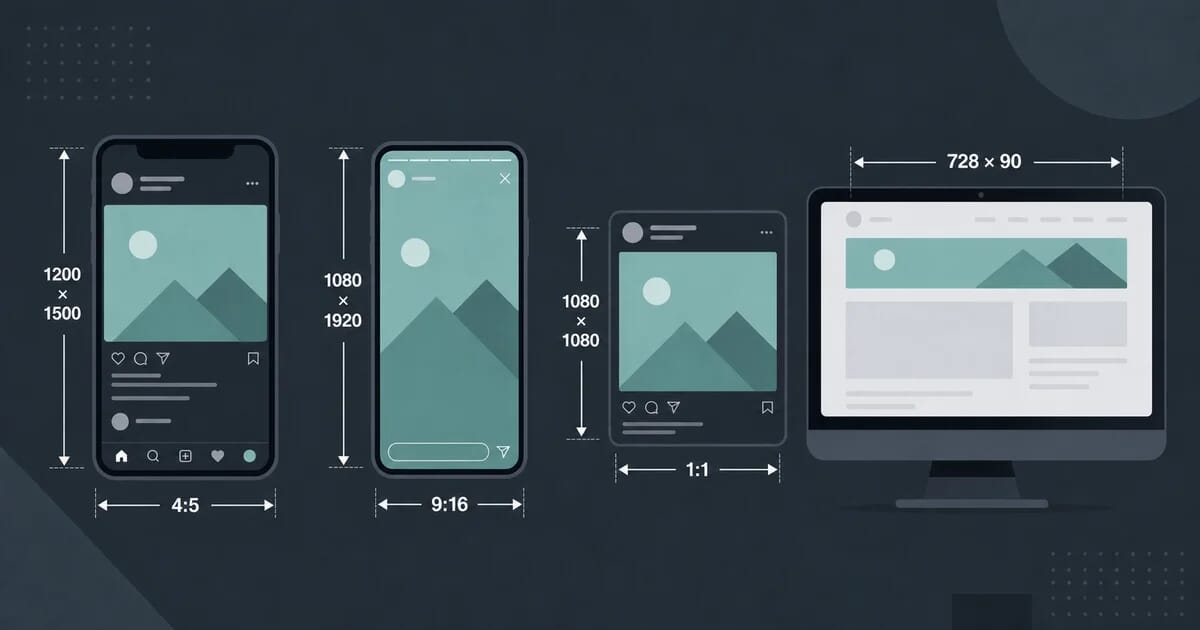
Meta runs the largest set of paid surfaces, so it sets the pace for most teams. Two ratios cover almost everything: 1:1 for feeds and 9:16 for vertical surfaces.
Feed Ads
| Property | Square feed ad | Landscape feed ad |
|---|---|---|
| Recommended size | 1080 × 1080 | 1200 × 628 |
| Ratio | 1:1 | 1.91:1 |
| Min width | 600 px | 600 px |
| Formats | JPEG, PNG | JPEG, PNG |
The square 1080 × 1080 ad works on both Facebook and Instagram feeds. The landscape 1200 × 628 size matches the classic link-ad shape and still performs well on Facebook Marketplace and desktop feeds. Export at exactly these sizes; Meta scales anything larger down to them anyway.
Stories Ads
| Property | Value |
|---|---|
| Size | 1080 × 1920 |
| Ratio | 9:16 |
| Top safe zone | About 14% of height (~250 px) |
| Bottom safe zone | About 20% of height (~340 px) |
| Max file size | 30 MB |
| Formats | JPEG, PNG |
Stories ads render under the platform UI. The profile name and close button occupy the top band, and the CTA footer occupies the bottom band. Keep logos, headlines, and product shots inside the middle band. A headline that sits under the top UI is invisible, and a price that hides behind the CTA bar kills conversions.
Reels Ads
Reels ads use the same 1080 × 1920 canvas as Stories. Apply the same safe zones. One extra rule applies: Reels shows a progress bar and interaction icons along the edges, so keep critical content away from the left and right borders too.
Facebook Right Column
| Property | Value |
|---|---|
| Recommended size | 1080 × 1080 minimum |
| Display area | Small fixed box on desktop |
| Ratio | 1:1 |
Right-column ads render tiny. Design for legibility at thumbnail scale: one product, one short line of text, high contrast. Do not crop a feed creative for this slot; rebuild it.
Facebook Marketplace
Marketplace ads inherit the feed sizes: 1080 × 1080 square or 1200 × 628 landscape. Because buyers browse Marketplace with purchase intent, product-first images outperform lifestyle shots here.
Google Display Network Banner Sizes
Google Display Network (GDN) is a different world from social feeds. Banners appear on millions of third-party sites, and Google standardises the slots. Five sizes cover the large majority of impressions.
| # | Name | Pixels | Typical position |
|---|---|---|---|
| 1 | Medium rectangle (MPU) | 300 × 250 | In-content, sidebar |
| 2 | Leaderboard | 728 × 90 | Page top |
| 3 | Mobile banner | 320 × 50 | Screen top or bottom |
| 4 | Wide skyscraper | 160 × 600 | Sidebar |
| 5 | Half page | 300 × 600 | Sidebar, premium slots |
| Property | Value |
|---|---|
| Max file size | 150 KB per banner |
| Formats | GIF, JPEG, PNG, HTML5 |
| Animation | Max 30 seconds |
The 150 KB limit is the hard constraint. A photographic banner at 300 × 250 fits comfortably, but a busy 300 × 600 half page needs real compression work. Export PNG for flat graphics and JPEG for photos, then check the byte count before upload. If a photo banner will not fit under 150 KB at acceptable quality, simplify the composition instead of crushing quality further.
GDN also accepts responsive display ads where you supply assets and Google assembles combinations. Supply the logo at 1:1 and 4:1, a landscape image at 1.91:1, and keep text short; Google crops unpredictably otherwise.
X (Twitter) Ads
| Property | Value |
|---|---|
| Website card image | 1600 × 900 |
| Ratio | 16:9 |
| Max file size | 5 MB |
| Formats | JPEG, PNG |
The 1600 × 900 website card is the workhorse X ad unit. It pairs with a short headline and a CTA button below the image. X crops card previews aggressively in some clients, so keep the subject centred and leave breathing room at all four edges. Avoid text near the corners.
LinkedIn Ads
LinkedIn serves a professional audience with longer session times, and its ad units carry more text than most networks. Four image specs matter.
| Unit | Size | Ratio |
|---|---|---|
| Single image ad | 1200 × 627 | 1.91:1 |
| Carousel card | 1080 × 1080 | 1:1 |
| Company page banner | 1128 × 191 | ~5.9:1 |
| Spotlight ad | 1200 × 627 | 1.91:1 |
Notes per unit:
- Single image ads support up to 255 characters of intro text. The 1200 × 627 image renders above the copy, so treat it as the hook.
- Carousel cards each take a 1080 × 1080 square. Design cards as a sequence: problem, detail, detail, offer. Consistent margins across cards make the swipe feel intentional.
- Company banner at 1128 × 191 is a thin strip. It shows on desktop company pages next to the profile picture. Use it for a tagline or proof points, not detailed graphics.
- Spotlight ads use the same 1200 × 627 canvas as single image ads and dynamically attach a company logo, so leave clear space where the logo lands.
TikTok Ads
| Property | Value |
|---|---|
| Size | 1080 × 1920 |
| Ratio | 9:16 |
| Video length | 5–60 seconds |
| Image formats | JPEG, PNG |
TikTok is a video-first network, but image ads still run in some placements, and every video needs a cover frame. Design covers at 1080 × 1920 with the same edge discipline as Stories: nothing critical within roughly 14% of the top or bottom. For video creatives, put the brand and message inside the first three seconds; TikTok users decide faster than any other audience.
Pinterest Ads
| Property | Value |
|---|---|
| Size | 1000 × 1500 |
| Ratio | 2:3 |
| Max file size | 10 MB (video 500 MB) |
| Formats | JPEG, PNG |
Pinterest ads live or die by the vertical ratio. The 2:3 pin fills the most grid space, and Pinterest truncates pins that stray taller than 2:3 into a cropped preview. Put the product in the upper two-thirds and any text overlay in large type, because many users browse on small phones. Promoted pins that look identical to organic pins typically earn more saves than obviously designed ad frames.
YouTube Thumbnails and Third-Party Displays
| Property | Value |
|---|---|
| Thumbnail size | 3840 × 2160 |
| Ratio | 16:9 |
| Upload limit | Mobile video thumbnail: 2 MB; desktop: 50 MB |
| Formats | JPG or PNG |
YouTube currently recommends 3840 × 2160 for video thumbnails, with separate mobile and desktop upload limits. The thumbnail is an organic asset, but promoted videos show the same thumbnail in ad slots across YouTube and the Display Network. Treat thumbnails as ad creative: bold subject, minimal text readable at 168 px wide, strong contrast against YouTube’s dark and light themes alike.
Profile Picture Sizes Across Platforms
Profile pictures appear beside every ad, comment, and share. A blurry logo undermines even a great campaign, so lock these specs once.
| Platform | Upload size | Displayed as |
|---|---|---|
| Facebook page | 400 × 400 (min 170 × 170) | 176 × 176 on pages, 36 × 36 in comments; 180 × 180 legacy display |
| 320 × 320 minimum | 110 × 110 in profile, circle-cropped | |
| X (Twitter) | 400 × 400 | 200 × 200 in profile, circle-cropped |
| 400 × 400 | 400 × 400 max display, square with rounded corners | |
| TikTok | 200 × 200 minimum | Circle-cropped |
| 165 × 165 minimum | Circle-cropped | |
| YouTube | 800 × 800 | 98 × 98 channel icon, circle-cropped |
Practical rules:
- Upload at least 400 × 400 everywhere. Platforms downscale cleanly; upscale poorly.
- Instagram, X, TikTok, Pinterest, and YouTube crop to circles. Centre the mark, and keep it inside an inscribed circle with margin.
- Facebook displays the picture at many sizes, from 36 px comment avatars to large page headers. Test at the smallest size; if the mark turns to mush, simplify it.
- Export logos as PNG with transparency so they sit clean on any background. JPEG artefacts smear fine lettering at avatar scale.
Text-Safe Zones by Surface
Every network punishes text in the wrong place differently. Use this consolidated table during layout reviews.
| Surface | Top reserve | Bottom reserve | Side reserve | Notes |
|---|---|---|---|---|
| IG/FB Stories ads | ~14% | ~20% | Minimal | UI overlays plus CTA bar |
| Reels ads | ~14% | ~20% | ~10% | Progress bar and icons at edges |
| TikTok ads | ~14% | ~20% | ~10% | Same vertical grammar as Stories |
| GDN banners | None mandated | None mandated | None mandated | Publisher sites vary; keep 8–10% padding |
| X website cards | Low risk | Low risk | Crop risk | Keep subject centred |
| Pinterest pins | Low risk | Truncation | None | Stay at 2:3 to avoid cropping |
| YouTube thumbnails | Timestamp badge | Duration badge | Corner marks | Avoid bottom-right corner |
Two habits prevent most rejections. First, build every vertical creative from a template with the safe zones drawn as guides. Second, preview each placement in the platform’s own preview tool before launch; the previews show the exact UI overlays.
File Formats and Weight Limits Per Platform
| Platform | Formats | Typical image limit |
|---|---|---|
| Meta (FB/IG) | JPEG, PNG | 30 MB |
| Google Display | JPEG, PNG, GIF, HTML5 | 150 KB |
| X ads | JPEG, PNG | 5 MB |
| JPEG, PNG, GIF | 5 MB | |
| TikTok | JPEG, PNG | Unlisted, keep under 10 MB |
| JPEG, PNG | 10 MB | |
| YouTube video thumbnail | JPG, PNG | 2 MB mobile / 50 MB desktop |
Export guidance that holds across all of them:
- Photographs: JPEG at quality 80–85. See image export settings for encoder flags per tool.
- Flat graphics, logos, text-heavy banners: PNG-24, or PNG-8 when the palette allows.
- Never upload files at the limit “because you can”. Platforms re-encode uploads, and a lean source file survives re-encoding with fewer artefacts. Our social media image optimization guide covers the full pipeline.
The Master-Image Workflow
Designing ten separate canvases per campaign wastes time and drifts off-brand. Instead, design one master and derive every crop.
Step 1: Design the master at 1080 × 1350 (4:5).
The 4:5 portrait frame is the tallest common denominator. Compose the hero product, headline, and logo inside a centred core that survives cropping to 1:1, 1.91:1, and 9:16.
Step 2: Define the crop plan.
| Target placement | Crop from master | Extra work |
|---|---|---|
| Meta feed square | Centre 1080 × 1080 | None |
| Meta/LinkedIn landscape | Centre 1200 × 628 | Widen background |
| Stories/Reels/TikTok | Extend vertically to 1080 × 1920 | Add top/bottom background |
| GDN MPU | Recompose at 300 × 250 | Simplify to one element |
| GDN leaderboard | Recompose at 728 × 90 | Horizontal strip layout |
| Pinterest pin | Use master as-is | Add text overlay |
| X website card | Centre 1600 × 900 | Widen background |
Step 3: Automate the exports.
A script or batch action turns the plan into files in seconds. The pattern: one layered master file, named export presets per placement, and a folder structure that maps one-to-one to ad platform uploads. Our batch image processing workflows guide shows the scripting approach.
Step 4: QA against the safe-zone table.
Before upload, check each export against the safe zones above. Ten minutes of checking prevents the classic failure: a campaign approved with the headline hidden under the Stories UI.
For galleries, zoomable product views, and spin presentations that back your landing pages, Sirv’s media viewer handles delivery automatically, so your ad clicks land on fast pages.
Common Mistakes
- Designing only the hero size. Teams polish the 1080 × 1080 feed ad and crop it blindly for everything else. The Stories crop then hides the logo and the leaderboard crop becomes unreadable.
- Ignoring the 150 KB GDN limit until export day. Rich half-page designs often need recomposition, not just compression. Plan simple compositions for display banners from the storyboard stage.
- Text outside safe zones. Automated review rejects some placements outright; others render with the text hidden. Both waste budget.
- Uploading tiny profile pictures. A 170 px logo upscaled by the platform looks soft next to competitors who uploaded 400 px. Set the profile specs once per year.
- JPEG for logos. Compression artefacts halo white text on coloured backgrounds. Use PNG for anything with sharp edges.
- Assuming organic sizes transfer. An organic pin at 1000 × 1500 works as a promoted pin, but an organic Story layout usually fails ad review because it ignores the CTA bar zone.
Quick Reference Card
Bookmark this summary. Full details sit in the sections above.
| Need | Go-to size |
|---|---|
| Meta feed ad | 1080 × 1080 |
| Meta link ad | 1200 × 628 |
| Stories/Reels/TikTok ad | 1080 × 1920 |
| GDN MPU | 300 × 250 |
| GDN leaderboard | 728 × 90 |
| GDN mobile banner | 320 × 50 |
| GDN wide skyscraper | 160 × 600 |
| GDN half page | 300 × 600 |
| X website card | 1600 × 900 |
| LinkedIn single image | 1200 × 627 |
| LinkedIn carousel | 1080 × 1080 |
| LinkedIn company banner | 1128 × 191 |
| Pinterest ad | 1000 × 1500 |
| YouTube thumbnail | 3840 × 2160 |
| Profile picture (all) | 400 × 400 upload |
Where to Go Next
- Organic feed dimensions: 12 Social Media Image Sizes Worth Bookmarking
- Compression pipeline for social exports: Social Media Image Optimization
- Product shots that convert in ads: Ecommerce Product Images
- Encoder settings per format: Image Export Settings
If you want AI help writing alt text, removing backgrounds, or editing campaign imagery at speed, Sirv Studio bundles those tools with CDN delivery. You can create a free account and test the full pipeline on your own creatives.