Image Placeholders: LQIP, Blurhash, and Thumbhash Explained
Image placeholders compared: solid colour, LQIP, Blurhash, Thumbhash, SQIP and CSS blurs, with decode cost and which suits your stack.
Disclosure: ImageGuide is published by Sirv, an image CDN company. This guide mentions Sirv products. Read how we write these guides.
Quick answer
Image placeholders show a temporary color, blur, or compact preview while the full image loads. They improve visual continuity but do not replace width and height or make the final file arrive sooner. Keep placeholder payloads small and measure whether they help the page’s actual loading experience.
Reference for this answer: Google guidance on image LCP.
A blank gray box where an image will appear makes a page feel slow even when everything else loads instantly. An image placeholder fixes that. It fills the space before the real pixels arrive, so users see structure instead of emptiness. Done well, a placeholder makes a 2-second image load feel like 300 milliseconds.
This guide covers every mainstream placeholder technique: solid colors, tiny scaled-down previews (LQIP), Blurhash, Thumbhash, SQIP, and a pure-CSS approach. You will learn how each works, what it costs at runtime, and which one fits your stack.
Why Placeholders Matter
Placeholders improve two different metrics at once, and it helps to separate them.
Perceived performance. Users judge speed by what they see, not by what the network does. A page that shows blurred color previews within the first paint feels faster than a page that shows white gaps, even if both finish loading at the same moment. This is the same psychology behind skeleton screens and progress bars.
Layout stability. A placeholder reserves space at the correct aspect ratio before the image loads. Without it, content jumps down when images arrive. That jump is Cumulative Layout Shift, one of the Core Web Vitals that Google measures. We cover the full picture in our guide to images and Core Web Vitals.
The cheapest placeholder is simply this CSS:
img {
  aspect-ratio: 16 / 9;
  background-color: #eee;
}
That prevents layout shift. It does nothing for perceived performance. The techniques below add the visual richness that makes loads feel instant.
The Spectrum of Placeholder Techniques
There is a trade-off between how good a placeholder looks and how many bytes it costs. The main options form a spectrum:
| Technique | Typical size | Visual quality | Needs JS? |
|---|---|---|---|
| Solid color | ~7 characters | Flat fill | No |
| Tiny scaled-down image (LQIP) | 300–2000 bytes | Recognizable photo | No |
| CSS blur over LQIP | 300–2000 bytes | Soft, attractive | No |
| SQIP | 500–1500 bytes | Stylized shapes | No |
| Blurhash | 20–40 characters | Smooth color gradient | Yes |
| Thumbhash | 20–50 characters | Small real thumbnail | Yes |
Move right for smaller payloads, left for fidelity. No single option wins every column, which is why the ecosystem produced so many formats.
Solid Color
Extract the dominant color of each image at build time and store it as a string. Pinterest famously used dominant-color placeholders before adopting richer techniques. A solid color costs almost nothing and works everywhere, including email and no-JS environments. Its weakness is obvious: a flat rectangle tells users something is coming, but not what.
Dominant color extraction is simple with sharp:
const sharp = require("sharp");

const stats = await sharp("photo.jpg").stats();
const dominant = stats.dominant; // r, g, b values
LQIP: Tiny Scaled-Down Images
LQIP stands for Low-Quality Image Placeholder. The idea: shrink the image to roughly 20 pixels wide, compress it hard as JPEG or WebP, inline it as a base64 data URI, and stretch it across the full container. A 1600-pixel photo becomes a few hundred bytes of fuzzy preview.
Because the preview is a real downscaled copy, it preserves the actual composition. Users see the rough shape of the photo immediately. Add a CSS blur and the compression artifacts melt into a soft wash that looks intentional:
.placeholder {
  background-image: url("data:image/jpeg;base64,/9j/4AAQ...");
  background-size: cover;
  background-position: center;
  filter: blur(20px);
  transform: scale(1.05); /* hides bright edges caused by the blur */
}
The slight upscale hides the darkened edges that filter: blur produces. When the full image loads, crossfade the two layers with a short opacity transition.
LQIP is the workhorse of the field. It needs no JavaScript to display, works in any framework, and looks good. Its only cost is payload: multiply 500 bytes by 100 gallery images and you ship 50 KB of hidden HTML. That is usually acceptable, but it motivated the search for something smaller.
How Blurhash Works
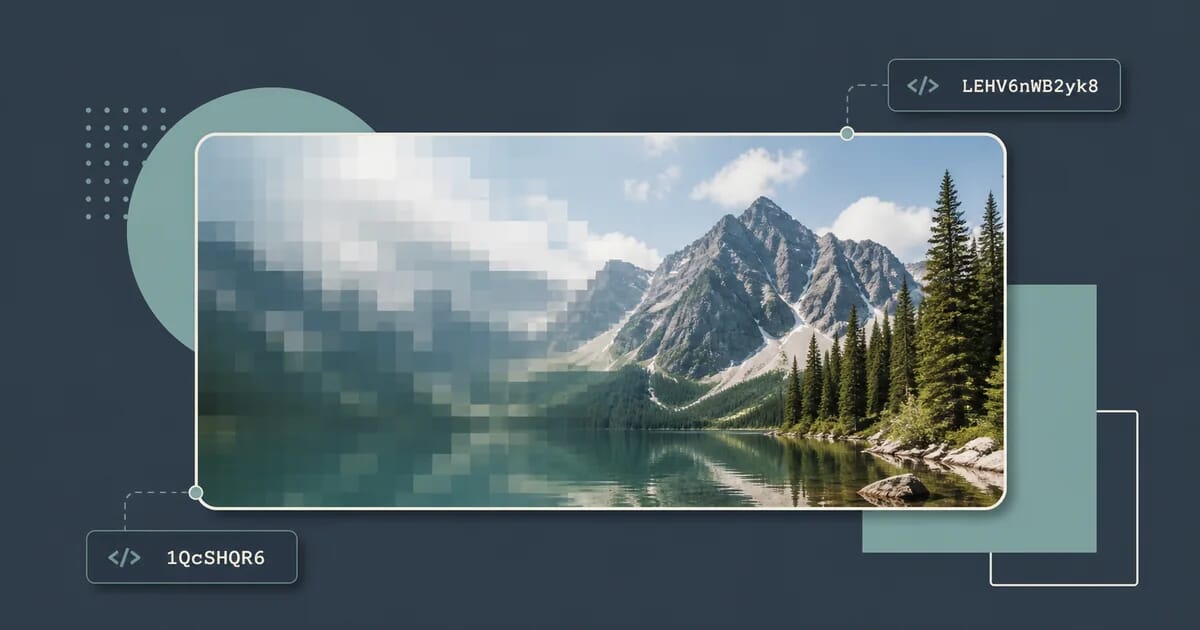
Blurhash, released by the engineering team at Wolt in 2019, compresses a preview into about 20 to 30 ASCII characters such as LEHV6nWB2yk8pyo0adR*.7kCMdnj. That string is short enough to store directly in your database next to the image record, send inside a JSON API response, or embed in a message payload.
The algorithm borrows from JPEG. JPEG splits an image into blocks and applies a Discrete Cosine Transform, or DCT, which represents each block as a weighted sum of cosine waves at increasing frequencies. Blurhash applies the same mathematics to the whole image at once, but keeps only the lowest frequencies: broad gradients of color, no detail.
Concretely, encoding works like this:
- Pick a component grid, typically 4 by 3. Each cell becomes one cosine term.
- Convert every pixel from RGB to a linear-light sRGB variant so averaging behaves correctly.
- For each component, compute how strongly the whole image correlates with that component’s cosine pattern. This produces one average color plus a set of AC coefficients.
- Quantize the coefficients and pack them into a Base83 string with a small header describing the component counts.
Decoding reverses the process. For each output pixel, evaluate the sum of cosine terms and convert back to sRGB. The result is a smooth, painterly gradient that matches the original’s overall palette and lighting. It contains no recognizable detail, but it captures mood far better than a flat color.
The key property is asymmetry. Encoding requires pixel access and runs offline or at upload time. Decoding is pure arithmetic on a short string, so clients can regenerate the preview anywhere, anytime, from data they already have. You never transmit the preview itself.
Using the blurhash npm Package
The reference implementation ships as blurhash on npm. Encoding expects raw RGBA pixel data, which sharp can produce:
const sharp = require("sharp");
const { encode } = require("blurhash");

async function blurhashFromFile(path) {
  const { data, info } = await sharp(path)
    .raw()
    .ensureAlpha()
    .resize(32, 32, { fit: "inside" })
    .toBuffer({ resolveWithObject: true });

  return encode(
    new Uint8ClampedArray(data),
    info.width,
    info.height,
    4, // xComponents
    3  // yComponents
  );
}

blurhashFromFile("photo.jpg").then(console.log);
// e.g. "LEHV6nWB2yk8pyo0adR*.7kCMdnj"
More components produce a more detailed hash and a longer string. Values between 4 by 3 and 6 by 4 suit most photos. Note that encode expects the pixel buffer dimensions to match exactly what you pass in, so keep the resize and the numbers in sync.
Decoding happens in the browser:
import { decode } from "blurhash";

function drawBlurhash(canvas, hash, width, height) {
  const pixels = decode(hash, width, height);
  const ctx = canvas.getContext("2d");
  const imageData = ctx.createImageData(width, height);
  imageData.data.set(pixels);
  ctx.putImageData(imageData, 0, 0);
}

drawBlurhash(document.querySelector("canvas"), hash, 32, 32);
Decode to a small canvas, around 32 by 32 pixels, then let CSS scale it up and apply a light blur. Decoding at full container size wastes CPU for no visual gain.
Thumbhash: A Different Trade-Off
Thumbhash, created by Figma co-founder Evan Wallace in 2022, answers the main complaint about Blurhash: its output is too abstract. Because Blurhash keeps only low frequencies, two very different photos can produce nearly identical smears. A sunset and a red sports car on sand may decode to the same warm gradient.
Thumbhash stores an actual tiny thumbnail instead of a frequency summary. It binary-packs a small RGBA image, roughly 16 by 16 pixels or smaller, using a simplified DCT scheme tuned for size, then serializes the result as compact bytes that render as a short base64 string. Three differences matter in practice:
| Aspect | Blurhash | Thumbhash |
|---|---|---|
| What it stores | Low-frequency color model | Real miniature thumbnail |
| Decoded fidelity | Smooth gradient, no detail | Recognizable shapes |
| Aspect ratio | Not encoded; you supply it | Encoded in the hash |
| Alpha channel | Supported | Supported |
| Maturity | Wide adoption, many ports | Newer, fewer libraries |
Aspect-ratio encoding is a quiet win. Blurhash strings do not carry the image proportions, so your API must send width and height separately to reserve space correctly. Thumbhash embeds them, which removes a whole class of layout-shift bugs.
Fidelity is the headline win. In side-by-side tests, Thumbhash previews usually read as “tiny version of the photo” while Blurhash reads as “color mood of the photo.” For grids of product shots or portfolio thumbnails, that difference is often worth the switch.
The costs: Thumbhash strings run slightly longer, the library ecosystem is younger, and decoding cost is comparable to Blurhash. If your framework already integrates Blurhash deeply, the migration gain may be modest. For new projects, start with Thumbhash.
Both formats share the same workflow: encode once at upload or build time, store the string alongside the image record, decode on the client into a canvas or bitmap, and fade in the real image when it arrives.
SQIP: SVG-Based Placeholders
SQIP takes a third approach. It produces a small SVG that approximates the photo, either with layered geometric primitives or with an embedded, heavily blurred raster. Because the output is SVG, it scales crisply, compresses well, and can sit directly in your markup.
<svg xmlns="http://www.w3.org/2000/svg" viewBox="0 0 1600 900">
  <filter id="b">
    <feGaussianBlur stdDeviation="12" />
  </filter>
  <image
    href="data:image/jpeg;base64,...tiny preview..."
    filter="url(#b)"
    preserveAspectRatio="none"
  />
</svg>
SQIP occupies a middle ground. It looks better than a raw LQIP because the browser applies the blur, yet the payload still includes the embedded raster. Use it when you want placeholder markup that travels with the HTML document and renders without any script at all.
Generating Placeholders at Build Time
Whatever format you choose, generation belongs in your build pipeline or your upload flow, never in request handling. Here is a sharp script that emits both an LQIP data URI and a Blurhash for every image in a directory:
// generate-placeholders.mjs
import sharp from "sharp";
import { encode } from "blurhash";
import { readdir, writeFile } from "node:fs/promises";

async function placeholderFor(path) {
  const tiny = await sharp(path)
    .resize(20)
    .jpeg({ quality: 40 })
    .toBuffer();

  const lqip = `data:image/jpeg;base64,${tiny.toString("base64")}`;

  const { data, info } = await sharp(path)
    .resize(32, 32, { fit: "inside" })
    .ensureAlpha()
    .raw()
    .toBuffer({ resolveWithObject: true });

  const hash = encode(new Uint8ClampedArray(data), info.width, info.height, 4, 3);

  const meta = await sharp(path).metadata();
  return { path, lqip, hash, width: meta.width, height: meta.height };
}

const files = await readdir("./public/images");
const results = await Promise.all(
  files.filter((f) => /\.(jpe?g|png|webp)$/i.test(f))
       .map((f) => placeholderFor(`./public/images/${f}`))
);

await writeFile("./src/placeholders.json", JSON.stringify(results, null, 2));
Run this as part of your build, import the JSON where you render images, and every image gets a placeholder with zero runtime encoding cost. Frameworks with image pipelines often do this for you: Next.js returns a tiny blurred preview from its image optimizer, and Astro exposes one through its image service.
If you serve images through a CDN instead, check whether it offers built-in previews. Sirv, for example, pairs automatic resizing with its media viewer, which handles progressive loading and zoomable galleries so placeholders come largely for free. For AI-driven workflows such as cutouts and retouching before you publish, Sirv Studio processes batches without a local pipeline. You can create an account and point it at an existing bucket.
CMS Integrations
Modern headless CMS platforms increasingly treat placeholders as first-class metadata.
Sanity computes placeholder data during asset upload. Every image asset carries a metadata.lqip field: a tiny base64 preview generated server-side. Query it directly in GROQ, render it as a background, and swap in the full image on load. Community plugins add Blurhash support on top if you prefer hashes over data URIs.
Contentful delivers images through its Images API, which supports requesting heavily compressed renditions by adjusting quality and size parameters. Teams either fetch a deliberately degraded rendition as the placeholder or compute a Blurhash in an upload app or webhook and store it in a content field. The second approach keeps API responses tiny, which matters at Contentful’s rate limits.
Strapi, Payload, and WordPress generally rely on plugins or build-step scripts like the sharp example above. The pattern is always the same: hook into upload, generate the placeholder, persist it beside the asset URL.
When you control the schema, prefer storing a hash string over a data URI. Hashes keep API payloads small and let each client choose its own preview resolution.
The Cost of Decoding
Placeholder decoding is not free, and large galleries expose sloppy implementations.
Blurhash and Thumbhash decoding cost grows with output pixel count and component count. Decoding one hash to 32 by 32 pixels takes well under a millisecond on current hardware. Decoding hundreds of hashes to full container sizes on the main thread can block interaction for tens of milliseconds each, and the jank compounds during fast scrolling.
Three rules keep the cost invisible:
- Decode small. Render the preview at 24 to 48 pixels and let CSS scale it. Never decode at layout size.
- Move off the main thread. Batch-decode in a Web Worker, or use
OffscreenCanvaswhere available, when a view shows dozens of placeholders at once. - Decode lazily. Only decode hashes for images near the viewport. Combine with the intersection-observer patterns described in our lazy loading guide.
LQIP and SQIP shift the cost to the network instead of the CPU. The browser’s native image decoder handles them efficiently, but each data URI adds bytes to your HTML, which delays First Contentful Paint on slow connections. As a rule of thumb, keep total inline placeholder weight under 5 percent of your critical-path HTML budget.
Accessibility Notes
Placeholders are decoration. Screen readers should never announce them, and they must never replace the information in the real image.
- Keep the real
<img>element with its meaningfulalttext in the DOM. Layer the placeholder behind or beneath it; do not swap elements. - Mark decorative placeholder layers with
aria-hidden="true"and give themalt=""if they are images. - Reserve space with
aspect-ratioor explicit dimensions so assistive technology sees a stable layout whether or not images load. - Ensure the transition from placeholder to image never traps focus or triggers scroll. Animate opacity only.
- Respect
prefers-reduced-motionby skipping the crossfade animation for users who ask for less motion.
Our fuller checklist lives in the image accessibility guide.
Which Technique Should You Use?
| Situation | Recommended technique |
|---|---|
| Static site with a build step | LQIP or Blurhash generated by sharp at build time |
| Large image grids, feeds, chat apps | Blurhash or Thumbhash stored in the database |
| Product cards needing recognizable previews | Thumbhash |
| No JavaScript allowed, email, AMP | Solid color or SQIP |
| CMS-driven content | Platform-native field: Sanity lqip, or a hash in a custom field |
| Quick win on an existing site | CSS-only: tiny base64 preview plus filter: blur |
| Image CDN already in place | Whatever the CDN provides natively |
A sensible default for most teams: generate a Blurhash or Thumbhash at upload, store it beside the image record, decode to a small canvas on the client, and crossfade to the real image. Add LQIP data URIs only when you need placeholders to render with zero JavaScript.
Whichever route you take, pair the placeholder with modern delivery formats. Serving the real image as WebP or AVIF typically halves transfer time, which shrinks the window the placeholder must cover. Our complete WebP guide and responsive images guide cover that half of the equation.
Placeholders do not make images load faster. They make waiting feel shorter, and they stop layout from jumping. Both effects are free if you generate the placeholder once and spend a few hundred bytes storing it. Few performance improvements offer a better ratio of perceived gain to actual effort.