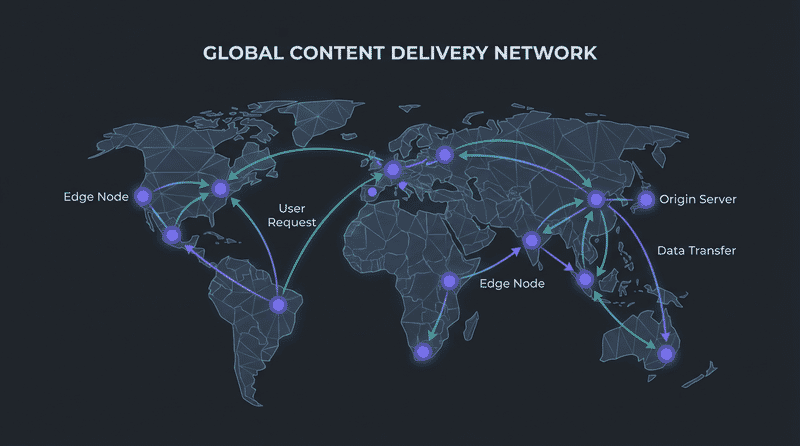
Image CDNs transform, optimize, and deliver images globally. This guide compares the leading services to help you choose the right one for your needs.
What Image CDNs Do
Unlike traditional CDNs that only cache and deliver, image CDNs provide:
- Real-time transformation: Resize, crop, filter on-the-fly
- Format conversion: Automatic WebP/AVIF delivery
- Quality optimization: Smart compression
- Global delivery: Edge caching worldwide
- Responsive images: Generate srcset variants
- Storage: Host your images (most services)
Quick Comparison
| Service | Best For | Starting Price | AVIF | AI Features |
|---|
| Cloudinary | Full-featured apps | $0 (free tier) | Yes | Yes |
| Imgix | Performance-critical | $100/mo | Yes | Yes |
| Sirv | E-commerce, 360 spin | $19/mo | Yes | Yes (via AI Studio) |
| Bunny Optimizer | Budget-conscious | $9.50/mo | Yes | Limited |
| Cloudflare Images | Cloudflare users | $5/mo | Yes | No |
| ImageKit | Developers | $0 (free tier) | Yes | Yes |
| KeyCDN | Simple needs | Pay-as-you-go | No | No |
Cloudinary
Overview
The most feature-rich image CDN with extensive transformation options and AI capabilities.
Features
| Feature | Support |
|---|
| On-the-fly transforms | 200+ transformations |
| Format conversion | WebP, AVIF, auto |
| AI features | Face detection, auto-crop, background removal |
| Video processing | Full support |
| Storage | Included |
| DAM features | Full digital asset management |
Pricing
| Plan | Price | Transformations | Storage |
|---|
| Free | $0 | 25K/month | 25GB |
| Plus | $99/mo | 225K/month | 225GB |
| Advanced | $249/mo | 800K/month | 800GB |
| Enterprise | Custom | Unlimited | Custom |
URL Structure
https://res.cloudinary.com/demo/image/upload/
  w_800,           # Width 800px
  h_600,           # Height 600px
  c_fill,          # Crop mode
  g_face,          # Focus on face
  q_auto,          # Auto quality
  f_auto           # Auto format (WebP/AVIF)
  /sample.jpg
Code Example
// Cloudinary URL builder
function cloudinaryUrl(publicId, transforms = {}) {
  const {
    width,
    height,
    crop = 'fill',
    quality = 'auto',
    format = 'auto',
    gravity = 'auto'
  } = transforms;

  const parts = [];
  if (width) parts.push(`w_${width}`);
  if (height) parts.push(`h_${height}`);
  parts.push(`c_${crop}`);
  parts.push(`g_${gravity}`);
  parts.push(`q_${quality}`);
  parts.push(`f_${format}`);

  const transformString = parts.join(',');

  return `https://res.cloudinary.com/${CLOUD_NAME}/image/upload/${transformString}/${publicId}`;
}

// Usage
const heroImage = cloudinaryUrl('hero.jpg', {
  width: 1920,
  height: 800,
  crop: 'fill',
  gravity: 'auto'
});
Best For
- Media-heavy applications
- User-generated content
- AI-powered cropping/transformations
- Teams needing DAM features
- Video + image in one platform
Limitations
- Complex pricing at scale
- Learning curve for advanced features
- Can be expensive for high-traffic sites
Imgix
Overview
Performance-focused image CDN with powerful real-time processing and excellent documentation.
Features
| Feature | Support |
|---|
| Transformations | 100+ parameters |
| Format conversion | WebP, AVIF, auto |
| AI features | Face detection, auto-crop |
| Video processing | Limited (imgix-video) |
| Storage | Bring your own (S3, GCS, etc.) |
| Purging | Instant |
Pricing
| Plan | Price | Master Images | Transformations |
|---|
| Basic | $100/mo | 10K | Unlimited |
| Growth | $500/mo | 100K | Unlimited |
| Enterprise | Custom | Unlimited | Unlimited |
Charges based on unique master images accessed per month
URL Structure
https://your-source.imgix.net/photo.jpg?
  w=800&           # Width
  h=600&           # Height
  fit=crop&        # Fit mode
  crop=faces&      # Crop to faces
  auto=format,compress  # Auto format/quality
Code Example
import ImgixClient from '@imgix/js-core';

const client = new ImgixClient({
  domain: 'your-source.imgix.net',
  secureURLToken: 'your-token' // Optional
});

const url = client.buildURL('/photo.jpg', {
  w: 800,
  h: 600,
  fit: 'crop',
  auto: 'format,compress'
});

// React component
import Imgix from 'react-imgix';

<Imgix
  src="https://your-source.imgix.net/photo.jpg"
  sizes="(min-width: 768px) 50vw, 100vw"
  imgixParams={{
    auto: 'format,compress',
    fit: 'crop'
  }}
/>
Best For
- Performance-critical applications
- Existing storage (S3, GCS)
- Developer-focused teams
- High-traffic sites needing predictable pricing
- React/JavaScript applications
Limitations
- No built-in storage
- Higher starting price
- No video processing in core product
Sirv
Overview
E-commerce focused image CDN with unique 360-degree spin support, excellent media management, and powerful AI features through Sirv AI Studio.
Features
| Feature | Support |
|---|
| Transformations | Extensive |
| Format conversion | WebP, AVIF, auto |
| 360 spin | Full support (unique feature) |
| Zoom | Deep zoom, magnifier |
| Storage | Included |
| Media viewer | Built-in gallery/zoom |
| AI Studio | Background removal, generative fill, object removal, upscaling, video generation, virtual try-on |
| Video processing | Full support (streaming, adaptive bitrate) |
Pricing
| Plan | Price | Storage | Bandwidth |
|---|
| Free | $0 | 500MB | 2GB/mo |
| Business | $19/mo | 10GB | 50GB/mo |
| Enterprise | $59/mo | 50GB | 200GB/mo |
| Custom | Contact | Unlimited | Unlimited |
URL Structure
https://your-account.sirv.com/image.jpg?
  w=800&           # Width
  h=600&           # Height
  q=80&            # Quality
  format=optimal&  # Auto format
  crop.type=face   # Smart crop
Code Example
// Sirv URL builder
function sirvUrl(path, params = {}) {
  const url = new URL(`https://your-account.sirv.com${path}`);

  const defaults = {
    format: 'optimal',
    q: 80
  };

  const merged = { ...defaults, ...params };

  Object.entries(merged).forEach(([key, value]) => {
    url.searchParams.set(key, value);
  });

  return url.toString();
}

// Product image with zoom
const productUrl = sirvUrl('/products/shoe.jpg', {
  w: 800,
  h: 800,
  'crop.type': 'pad',
  'canvas.color': 'ffffff'
});

// Sirv 360 spin viewer
// HTML: <div class="Sirv" data-src="https://demo.sirv.com/spin/shoe.spin"></div>
// JS:   <script src="https://scripts.sirv.com/sirvjs/v3/sirv.js"></script>
Sirv AI Studio
Sirv AI Studio provides powerful AI-powered editing capabilities:
- Background removal: Automatically remove backgrounds from product photos
- Generative fill: AI-powered content-aware fill to extend or modify images
- Object removal: Remove unwanted objects from images seamlessly
- Image upscaling: Enhance resolution using AI upscaling
- Smart cropping: AI-powered subject detection and cropping
- Video generation: Create videos from images or text prompts
- Virtual try-on: AI-powered product try-on for fashion and accessories
The Sirv Studio API enables programmatic access to these AI features, perfect for batch processing and automation.
// Sirv AI Studio API example
async function removeBackground(imageUrl) {
  const response = await fetch('https://www.sirv.studio/api/zapier/generate', {
    method: 'POST',
    headers: {
      'Authorization': `Bearer ${SIRV_STUDIO_API_KEY}`,
      'Content-Type': 'application/json'
    },
    body: JSON.stringify({
      model: 'remove-bg',
      image_url: imageUrl
    })
  });

  const result = await response.json();
  return result.image_url;
}
Best For
- E-commerce product images
- 360-degree product spins
- Deep zoom requirements
- Shopify/WooCommerce stores
- Built-in viewer needs
- AI-powered image editing (background removal, upscaling)
Limitations
- Smaller ecosystem than Cloudinary
Bunny Optimizer
Overview
Budget-friendly image optimization from Bunny.net, integrated with their CDN.
Features
| Feature | Support |
|---|
| Transformations | Basic (resize, crop, filter) |
| Format conversion | WebP, AVIF |
| AI features | Basic smart crop |
| Video processing | Via Bunny Stream |
| Storage | Bunny Storage |
| Price | Very competitive |
Pricing
| Component | Price |
|---|
| Optimizer | $9.50/mo per zone |
| Bandwidth | $0.01/GB |
| Storage | $0.01/GB/mo |
Pay-as-you-go model, very cost-effective
URL Structure
https://your-zone.b-cdn.net/image.jpg?
  width=800&
  height=600&
  quality=80&
  format=auto
Best For
- Budget-conscious projects
- Simple transformation needs
- Existing Bunny.net users
- High-bandwidth sites
- Cost-predictable scaling
Limitations
- Fewer transformation options
- Basic AI features
- Less mature than competitors
Cloudflare Images
Overview
Simple, affordable image service integrated with Cloudflare’s network.
Features
| Feature | Support |
|---|
| Variants | Pre-defined transforms |
| Format conversion | WebP, AVIF (auto) |
| AI features | None |
| Video processing | Cloudflare Stream |
| Storage | Included |
| Delivery | Cloudflare edge |
Pricing
| Plan | Price | Images | Deliveries |
|---|
| Images | $5/mo | 100K | Unlimited |
| Additional | $1/100K images | - | - |
URL Structure
https://imagedelivery.net/{account_hash}/{image_id}/{variant_name}

# Define variants in dashboard:
# - thumbnail: 150x150, fit=scale-down
# - hero: 1920x1080, fit=cover
# - public: original dimensions
Code Example
// Cloudflare Images uses pre-defined variants
const variants = {
  thumbnail: 'thumbnail',
  card: 'card',
  hero: 'hero',
  full: 'public'
};

function cfImageUrl(imageId, variant = 'public') {
  return `https://imagedelivery.net/${ACCOUNT_HASH}/${imageId}/${variants[variant]}`;
}

// Upload via API
async function uploadToCF(file) {
  const formData = new FormData();
  formData.append('file', file);

  const response = await fetch(
    `https://api.cloudflare.com/client/v4/accounts/${ACCOUNT_ID}/images/v1`,
    {
      method: 'POST',
      headers: {
        'Authorization': `Bearer ${API_TOKEN}`
      },
      body: formData
    }
  );

  return response.json();
}
Best For
- Cloudflare users
- Simple requirements
- Predictable pricing
- Sites with defined image sizes
- Integration with Cloudflare stack
Limitations
- Pre-defined variants only
- No real-time transformations
- Limited flexibility
- No AI features
ImageKit
Overview
Developer-friendly image CDN with good free tier and modern features.
Features
| Feature | Support |
|---|
| Transformations | Extensive |
| Format conversion | WebP, AVIF, auto |
| AI features | Auto-crop, background removal |
| Video processing | Basic support |
| Storage | Included |
| URL-based transforms | Yes |
Pricing
| Plan | Price | Bandwidth | Storage |
|---|
| Free | $0 | 20GB/mo | 20GB |
| Pro | $89/mo | 225GB/mo | 225GB |
| Enterprise | Custom | Custom | Custom |
URL Structure
https://ik.imagekit.io/your_id/image.jpg?
  tr=w-800,h-600,c-at_max,q-80,f-auto

# Or path-based:
https://ik.imagekit.io/your_id/tr:w-800,h-600/image.jpg
Best For
- Developers wanting free tier
- Modern API design
- React/Vue integrations
- Growing startups
- Mixed media needs
Limitations
- Smaller than Cloudinary/Imgix
- Less enterprise focus
- Newer platform
Feature Comparison
| Feature | Cloudinary | Imgix | Sirv | Bunny | CF Images | ImageKit |
|---|
| Resize | Yes | Yes | Yes | Yes | Variant | Yes |
| Crop | Yes | Yes | Yes | Yes | Variant | Yes |
| Face detection | Yes | Yes | Yes | Basic | No | Yes |
| Background removal | Yes | Yes | Yes (AI Studio) | No | No | Yes |
| Watermark | Yes | Yes | Yes | Yes | No | Yes |
| Text overlay | Yes | Yes | Yes | No | No | Yes |
| Filters/effects | 50+ | 30+ | 20+ | 10+ | No | 20+ |
| Chained transforms | Yes | Yes | Yes | Limited | No | Yes |
| AI upscaling | Yes | No | Yes (AI Studio) | No | No | No |
| Generative fill | Yes | No | Yes (AI Studio) | No | No | No |
| Video generation | Yes | No | Yes (AI Studio) | No | No | No |
| Virtual try-on | No | No | Yes (AI Studio) | No | No | No |
| Format | Cloudinary | Imgix | Sirv | Bunny | CF Images | ImageKit |
|---|
| WebP | Yes | Yes | Yes | Yes | Yes | Yes |
| AVIF | Yes | Yes | Yes | Yes | Yes | Yes |
| JPEG XL | No | Yes | No | No | No | No |
| Auto-format | Yes | Yes | Yes | Yes | Yes | Yes |
| Animated WebP | Yes | Yes | Yes | Yes | Yes | Yes |
| Metric | Cloudinary | Imgix | Sirv | Bunny | CF Images | ImageKit |
|---|
| Edge locations | 70+ | 50+ | 40+ | 100+ | 300+ | 40+ |
| First byte (avg) | ~50ms | ~40ms | ~60ms | ~30ms | ~20ms | ~50ms |
| Cache hit ratio | High | High | High | Very High | Very High | High |
Pricing Comparison
Low Traffic (1M requests/month)
| Service | Estimated Cost |
|---|
| Cloudflare Images | $5/mo |
| Bunny Optimizer | $15-20/mo |
| Sirv Business | $19/mo |
| ImageKit Free | $0 |
| Cloudinary Free | $0 |
| Imgix Basic | $100/mo |
Medium Traffic (10M requests/month)
| Service | Estimated Cost |
|---|
| Bunny Optimizer | $30-50/mo |
| Cloudflare Images | $5/mo + overages |
| Sirv Enterprise | $59/mo |
| Cloudinary Plus | $99/mo |
| Imgix Growth | $500/mo |
| ImageKit Pro | $89/mo |
High Traffic (100M+ requests/month)
| Service | Approach |
|---|
| Bunny Optimizer | Pay-as-you-go, very competitive |
| Cloudinary | Enterprise pricing, contact sales |
| Imgix | Enterprise, predictable at scale |
| Sirv | Custom pricing |
| Cloudflare | Contact sales |
Decision Framework
Choose Cloudinary If:
- You need extensive transformations
- AI features are important (face detection, auto-crop)
- You want DAM (Digital Asset Management)
- You process video alongside images
- Budget allows for premium features
Choose Imgix If:
- Performance is top priority
- You have existing storage (S3, GCS)
- You want predictable pricing at scale
- Developer experience matters
- You need JPEG XL support
Choose Sirv If:
- E-commerce is your focus
- You need 360-degree spins
- Deep zoom is required
- Shopify/WooCommerce integration needed
- Built-in viewer is valuable
- You need AI features like background removal, upscaling, or virtual try-on (Sirv AI Studio)
- You need video streaming with adaptive bitrate
Choose Bunny If:
- Budget is primary concern
- Basic transformations suffice
- High bandwidth needs
- Already using Bunny.net
- Simplicity over features
Choose Cloudflare Images If:
- You’re already on Cloudflare
- Image sizes are predictable
- Simple variant system works
- Want integration with Cloudflare
- Looking for simplest solution
Choose ImageKit If:
- You want a capable free tier
- Modern API matters
- React/Vue integration needed
- Growing without immediate budget
- Balance of features and price
Migration Considerations
From One CDN to Another
// URL rewriting approach
const cdnMigration = {
  from: 'https://res.cloudinary.com/demo/image/upload/',
  to: 'https://your-site.imgix.net/'
};

function migrateUrl(oldUrl) {
  // Extract path and transform params
  // Rebuild for new CDN format
  // Test thoroughly before switching
}
Key Migration Steps
- Audit current usage: List all transformation types
- Map transformations: Ensure new CDN supports all needs
- Test thoroughly: Compare output quality
- Gradual rollout: Use feature flags or percentage rollout
- Monitor performance: Compare loading times
- Update integrations: Framework plugins, SDKs
Summary
Quick Decision Matrix
| Priority | Recommended |
|---|
| Maximum features | Cloudinary |
| Best performance | Imgix or Bunny |
| E-commerce focus | Sirv |
| AI image editing | Cloudinary or Sirv (AI Studio) |
| Lowest cost | Bunny or Cloudflare |
| Best free tier | ImageKit or Cloudinary |
| Simplest setup | Cloudflare Images |
Cost-Effectiveness by Scale
| Scale | Most Cost-Effective |
|---|
| Startup (low traffic) | Free tiers (ImageKit, Cloudinary) |
| Growing (medium traffic) | Bunny or Sirv |
| Enterprise (high traffic) | Bunny or Imgix Enterprise |
Feature Priorities
| Need | Best Options |
|---|
| AI/ML features | Cloudinary, Sirv (AI Studio) |
| Video + Images | Cloudinary, Sirv |
| 360 product spins | Sirv |
| Background removal | Cloudinary, Sirv (AI Studio) |
| Virtual try-on | Sirv (AI Studio) |
| Deep Cloudflare integration | Cloudflare Images |
| Developer experience | Imgix, ImageKit |
| Budget optimization | Bunny, Cloudflare |
The right image CDN depends on your specific needs, budget, and scale. Start with free tiers when possible, and upgrade as your requirements become clearer.